


Selfira
4.7115.00 Reviews
App Specs
- Version
- 2.2.0
- Updated On
- License
- Free
- Downloads
- 50,000+
- Developer
- Work zone limited
- Categories
- Personalization
- Platform
- Android
Screenshots
 Analysis by AppCompare
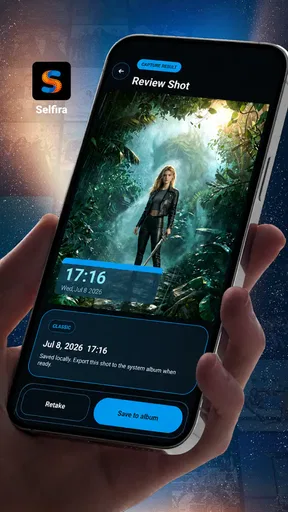
When I take a photo for a practical reason rather than a creative one, the image usually needs context. A picture of a meter, a delivered parcel, a damaged item, a worksite, or a temporary setup is much more useful when I can later see when it was captured. That is the narrow but sensible problem Selfira tries to solve: it is a personalization app built around a camera that places a timestamped watermark on local photo records.
I found the idea easy to understand, but the real question is whether a dedicated timestamp camera is more convenient for you than taking an ordinary photo and organizing it afterward. Selfira is free, aimed at Everyone, and developed by Work zone limited. Its store presence shows a 4.7 average from around 2.1 thousand ratings, with more than 50 thousand installs, so it has attracted a modest but clearly interested audience. Those figures do not make it automatically right for every phone, though. The value depends on whether visible capture information is part of your everyday workflow.
How to decide whether Selfira fits your camera routine
I would begin with the record you want to create, not with the camera itself. If the photo is mainly a memory, a social post, or a carefully edited image, a visible timestamp may be distracting. If the photo is evidence of a condition, a progress update, or a personal log, the date and time can be part of the image’s purpose rather than an unwanted decoration.
That distinction matters because Selfira is not simply another general-purpose camera replacement in my eyes. Its appeal is strongest when the watermark saves a step. Instead of taking a picture, opening an editor, adding text, and trying to remember the correct capture time, I can make a record with the timing information included from the start. The workflow is more direct, especially when I am taking several reference photos in sequence.
I would also consider how the images will be used later. A visible mark is useful when a picture is viewed outside the original photo library, such as in a message, a printed note, a shared folder, or a report. Metadata hidden inside a file can be overlooked or removed by another app, while text printed onto the image remains immediately visible. The trade-off is that the mark becomes part of the composition and may not be removable without cropping or editing.
For that reason, I would not use this as my only camera if I care about clean originals. I would treat it as a purpose-built tool alongside the regular camera app. That simple division makes the decision clearer: use the normal camera for images where presentation matters, and use Selfira when the timestamp is part of the record.
A practical test before making it your default
My suggested test is small and realistic. Take one photo that you would normally archive, one that you might send to another person, and one that you may need to compare with a later image. Then look at each result on its own, not just inside the camera preview. Ask whether the watermark helps someone understand the image immediately or whether it competes with the subject.
Worth Reading Before You Choose

EA SPORTS FC Mobile 26 Is a Bigger Football Game, but It Takes Time

Flipboard Shows What News Apps Must Do Beyond the Feed

Switching to Android Auto Means Rethinking Your Driving Routine

Google Calendar Makes a Crowded Week Easier to Manage

Ludo King Makes the Most of the Minutes Between Plans

Baby Panda World Brings Quick Play to Modern Phones, but Its Game Library Feels Busy
This test also exposes a common mistake: assuming that every timestamped picture has the same value. A date and time can establish when a record was made, but they do not explain what happened before or after the shot. If the situation matters, I would still add a useful filename, folder, or note outside the image. Selfira can make the visual record clearer, but it does not replace a complete filing system.
Another decision point is speed. For a person who only needs one dated picture every few weeks, installing a dedicated camera may feel unnecessary. For someone who repeatedly documents changing conditions, the avoided editing step can become worthwhile. The app makes most sense when the same need appears often enough that a manual workaround starts to feel irritating.
Where the focused approach is genuinely useful
The strongest use case I see is progress documentation. Imagine checking a room before a repair, photographing the same corner after each stage of a renovation, or recording the condition of equipment during a routine visit. With a visible time on each image, the files are easier to scan later. I would still keep the images in a clearly named album, but the watermark gives each individual photo a quick identity even when it is separated from that album.
It can also help with personal records that are easy to confuse. A timestamped image of a parcel at the door, a utility display, a plant’s growth, or a temporary storage arrangement can answer the basic question of when the picture was taken without relying entirely on the phone’s gallery sorting. This is especially handy when images are copied, renamed, or shared through a service that presents them in an unexpected order.
A less obvious advantage is communication under time pressure. If I send several pictures to someone who was not present, the visible timing helps them understand the order of events at a glance. That does not prove every detail of the situation, and I would never treat a watermark as a substitute for proper documentation, but it reduces the back-and-forth needed to explain which image came first.
The local-photo focus is another reason I would consider it for sensitive everyday records. I can use the resulting image as a record on the device rather than depending on a public posting workflow or a social platform. That does not by itself answer every privacy question a person may have about a camera app, so I would still check the app’s behavior and my phone’s permissions during setup. The practical point is that the intended result is a local image record, not a social feed.
Small workflow choices that make the results more useful
The first useful habit is to decide on a naming and storage routine before taking a large batch. A timestamp printed on the image helps, but it does not replace a sensible album structure. I would create separate groups for projects, household records, or recurring checks, then keep the same order each time. This makes the app more valuable because the watermark and the surrounding organization work together.
Second, I would leave enough visual breathing room around the subject. A timestamp can cover important detail if the camera is pointed too tightly at a display, label, or damaged surface. Before capturing the final image, I would frame the subject with a little extra space and check that the watermark is not sitting over the exact detail I need to show. This is a simple trade-off: slightly wider framing can make the record more readable later.
Third, I would use consistent viewpoints for comparisons. If I am documenting a repair or a gradual change, taking every photo from roughly the same position is often more informative than taking more photos from random angles. Selfira contributes the timing, but the quality of the comparison still depends on my method. The app is most effective when I use it as part of a repeatable process rather than as a magic proof button.
There is also a useful separation between a working record and a polished result. I would use Selfira for the dated progress images, then take a clean ordinary-camera photo when the job is complete. That gives me both the timeline and the presentable final image. Trying to make one watermarked picture serve both roles is where the app’s main strength can become a limitation.
Where ordinary camera apps and other approaches may fit better
The usual phone camera remains the better choice for portraits, food, travel scenes, and anything where the image itself is the finished product. It normally keeps the frame visually clean and is already familiar, so there is no switching cost. If I need advanced photographic controls, a specific lens behavior, or a polished editing workflow, I would start with the camera app designed for those priorities rather than forcing a timestamp tool into that role.
A gallery or file-management workflow may suit people who want to keep the original image untouched. Most phones already associate a capture time with a photo in their library, and a person who only needs to sort images later may prefer that invisible information. The downside is that the timing may not travel as clearly when the file is exported, printed, or shown outside the original gallery. Selfira’s visible mark is more immediate, but less flexible.
An image editor can be a better alternative when the timestamp must be added selectively or styled carefully. For example, if only a few images need a label, editing afterward avoids putting text on every shot. It also gives more control over placement and appearance. The cost is extra work, and manually entering or checking the correct time creates opportunities for mistakes. I see Selfira as the more convenient option for repeated, straightforward records, while an editor is better for occasional, presentation-sensitive annotations.
There is a further distinction between a timestamp and a full field-reporting system. A dedicated professional workflow may include notes, locations, signatures, export formats, or team review. I would not assume a timestamp camera replaces those tools. Selfira is attractive precisely because it appears focused: it can reduce friction for local photo records without asking me to manage a larger system. That simplicity is a strength for personal use and a reason to look elsewhere when formal reporting is required.
The friction involved in changing your routine
Because Selfira is free, the financial barrier is low. The more meaningful cost is habit. I need to remember to open a different camera, decide when a watermark is appropriate, and keep the resulting pictures organized with the rest of my photos. If I already have a reliable method, switching may add a step instead of removing one.
There is also the visual cost of committing information to the image. Once the timestamp is part of the picture, I cannot simply hide it in the gallery view. That is excellent for a record that may be forwarded on its own, but inconvenient if I later want to reuse the same image in a clean presentation. My workaround would be to capture important scenes twice only when necessary: one record image with the timestamp and one clean image for display. That is practical, but it uses more storage and attention.
Compatibility is worth checking before relying on the app for an important routine. Selfira’s current version is 2.2.0 and requires Android 8.0 or later. On a compatible device, I would still do a short trial with the exact lighting, framing, and sharing method I expect to use. A camera workflow can feel fine in a preview but behave differently once images are opened in another gallery or sent through a messaging app, so testing the complete path is more useful than testing only the shutter.
The app’s age rating of Everyone makes it approachable for general household use, but that should not be confused with suitability for every professional purpose. If the image may be used in a dispute, inspection, or formal process, I would preserve the original files, keep the surrounding context, and follow the relevant rules rather than relying on the visible timestamp alone. A watermark improves clarity; it does not establish a complete chain of custody.
Who should install it, and who should skip it
I would recommend trying Selfira if you regularly photograph things that change, need to be checked later, or may be viewed away from your own phone. It is particularly sensible for personal project logs, household condition records, simple before-and-after documentation, and quick local archives. The app’s focused purpose means I do not have to turn every ordinary photo into a labeled document; I can open it when the record matters more than the picture’s appearance.
I would be more cautious if you mainly take creative photos or dislike any text over an image. In that case, the regular camera is likely to be less intrusive, and a gallery’s built-in capture information may already meet your needs. I would also skip Selfira as a primary solution if you need structured forms, team collaboration, or formal evidence management. A timestamp alone is too narrow for those jobs.
For someone unsure, the free price makes a short trial reasonable. I would not migrate my whole photo habit immediately. Instead, I would use it for one recurring task, such as documenting a repair or keeping a dated household record. After a week or two of that workflow, the answer should be clear: either the visible time saves enough effort to earn a permanent place on the phone, or the normal camera and gallery are already simpler.
My overall recommendation is therefore specific rather than universal. Selfira is a useful specialist camera for people who want the capture time printed directly onto local photo records. Its best quality is not photographic ambition but reduced ambiguity: a shared image can show its timing without requiring the viewer to inspect another screen or trust a file’s metadata. The compromise is equally clear, because the mark can limit reuse and does not replace proper notes or evidence practices.
Work zone limited has kept the concept focused enough that I can understand where it belongs in my app collection. I would keep a normal camera for clean images and use Selfira when the timestamp is part of the message. With that division, the app earns its space without pretending to replace every alternative in personal photography. For Android users on version 8.0 or later who repeatedly make dated local records, I think it is worth trying; for everyone else, the usual camera may remain the better everyday choice.
Pros
- Simple interface makes daily self-reflection quick to complete.
- Private journaling format encourages honest personal entries.
- Mood tracking can reveal emotional patterns over time.
- Custom prompts help users reflect when they lack inspiration.
- Useful for building a consistent self-care routine.
Cons
- Some features may require a subscription or in-app purchase.
- Limited value for users who prefer structured therapy tools.
- Frequent reminders could feel intrusive to some users.
- Insights depend on regularly recording accurate information.
- The app may not replace professional mental health support.
FAQs for Selfira
What is Selfira, and what can I use it for?
Selfira is a mobile application focused on helping users create, edit, and improve selfie-style photos and personal images. Depending on the version available in your region, it may include beauty adjustments, filters, retouching tools, lighting controls, and creative effects. It is designed for quick edits rather than professional photo production, making it suitable for social media posts, profile pictures, and casual image enhancements.
Is Selfira free to download and use?
Selfira may be available as a free download, but some features can be limited or supported by advertisements, in-app purchases, or a subscription. Before using advanced filters, premium editing tools, or exporting images without restrictions, check the pricing information shown in the app store and inside the application. Trial periods and subscription terms should also be reviewed carefully before confirming payment.
Does Selfira require an internet connection?
Basic functions in Selfira may work offline once the application and its required resources are installed, particularly simple photo editing tools. However, an internet connection may be necessary for downloading effects, accessing cloud-based features, displaying advertisements, synchronizing content, or completing purchases. Availability can vary by device and app version, so users should test the features they need before relying on Selfira without mobile data or Wi-Fi.
Is Selfira safe for editing and storing personal photos?
Before importing private images into Selfira, review its privacy policy and the permissions requested during installation. Photo-editing applications may request access to the camera, photo library, storage, or notifications, although not every permission is essential for basic use. Avoid granting unnecessary access, keep the app updated, and check whether images are processed locally or uploaded to external servers.
What devices are compatible with Selfira?
Selfira’s compatibility depends on the operating system, device model, and minimum software version specified on its official Google Play Store or Apple App Store listing. Newer phones generally provide better performance, especially when using high-resolution photos, live effects, or advanced retouching tools. If your device has limited storage or older hardware, check the requirements and user reviews before downloading.


